If the money isn't in your receiving account, don't confirm receipt and don't release the coins; a transfer screenshot from the buyer doesn't count. Whether the money has arrived is shown only by the credit record in your own account. The buyer may have chosen a standard or next-day transfer, so the money is still on its way, or may not have paid at all. If it still hasn't arrived by the deadline, open an appeal on that order instead of going quiet.
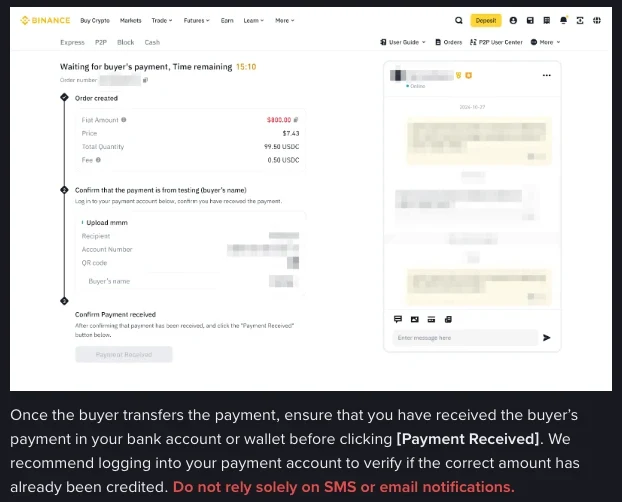
Binance's web guide to selling on P2P puts the steps in this order: once the buyer has transferred the payment, make sure it has reached your bank account or wallet before you click [Payment Received], and only then [Confirm Release]. It recommends logging in to your payment account to check that the correct amount has been credited, and adds one line in red: "Do not rely solely on SMS or email notifications." If the payment hasn't arrived, don't click [Confirm Release].
The buyer's "paid" button is just a button on the order page, and tapping it doesn't require any money to have gone out first. Because it can be tapped that way, the platforms list it as a violation in its own right: tapping it without paying is called malicious order blocking in Binance's CNY zone rules and fraudulent payment behavior in OKX's C2C rules, and either can lead to restrictions on some account functions.
Whether the money arrived shows only in your receiving account's credits
Before releasing, go through these steps in order:
- Log in to the receiving account you showed the buyer in the order, whether that's a banking app, online banking or a wallet. The payment method you add when placing the order is shown to the buyer for receiving their payment, so that is the account to check.
- Open the list of incoming transactions and find this payment. The amount has to match the order amount; even one cent short is not full payment.
- Check the payer's account name against the verified name of this order's buyer. If they don't match, it's a third-party payment: see what to do when a P2P payer's name doesn't match, and don't release the coins.
- Then check whether the account balance has changed to match. Only when the payment shows in the transaction list and the balance has gone up has the money actually reached your account.
A transfer screenshot from the buyer, or a text on your phone saying money has arrived, is only a lead. If the buyer presses you in chat to release first and says the money will be there any minute, still don't release: don't agree to any request to release crypto before you've confirmed receiving the payment.
Once the credit is checked, there are still a few things to do before and after releasing. The C2C safe-sell checklist lays them out as a list you can tick off.
Chinese bank transfers come as real-time, standard or next-day
When the buyer says the money has been sent and you haven't received it, one possibility is that it really is on its way: they didn't choose a real-time transfer. The People's Bank of China's Notice No. 261 of 2016 required banks and payment institutions, from 1 December that year, to offer depositors a choice of transfer methods such as real-time, standard and next-day arrival, and to process a transfer only after the depositor had chosen.
From 1 June 2019, when a customer chooses a non-real-time option such as standard or next-day arrival, banks and payment institutions also have to state clearly on the receipt or on screen that the transfer is not real-time (Notice No. 85 of 2019). If the receipt the buyer sends you says so, the money was never going to arrive straight away.
The platforms have their own payment requirements. Binance's CNY zone rules require the buyer to choose a real-time payment method, with a non-real-time one needing the seller's prior consent, and list what currently counts as non-real-time:
- Alipay to bank card, and WeChat to bank card;
- payment from one platform to another (Platform A to Platform B), such as Alipay to a quick-payment service;
- single transfers over CNY 50,000 between 17:00 and 09:00.
OKX's C2C rules list the same set. If the buyer uses a non-real-time method without the seller's consent, both platforms let the seller choose: go ahead with the trade, or refund and cancel the order. If you cancel, Binance requires the refund within 60 minutes of receiving the payment, and OKX within 30 minutes.
ATM transfers have a rule of their own. Except for transfers to the person's own account at the same bank, an individual's ATM transfer is processed by the issuing bank only 24 hours after it is accepted, and within those 24 hours the individual can apply to cancel it (Notice No. 261). In 2019 this gained an exception: if the ATM transfer screen shows the payee's name, account number and amount in Chinese, clearly states that the transfer is real-time, and the customer confirms it, the bank no longer has to apply the 24-hour rule (Notice No. 85). Whether standard or next-day transfers made in a mobile banking app can be cancelled is not settled uniformly in either document; that is a question for the payer's issuing bank. Until the money is credited, none of these transfers counts as received.
How to appeal on the order when the money doesn't arrive
Binance's order page has an [Appeal] button; click it when something goes wrong during the trade and Customer Support will step in on that order. If the money hasn't arrived, don't just stop replying and wait for the order to expire. Open an appeal yourself and say that your receiving account hasn't received the payment.
Article 11 of Binance's CNY zone rules covers exactly this case: if the seller hasn't received the payment within 1 hour of the buyer tapping "paid", then unless that payment method was agreed with you in advance, you can choose to go ahead with the trade or to refund and cancel the order. Non-CNY trades have separate appeal handling rules, and the parts that concern a seller who hasn't received the money are these:
- The buyer didn't actually pay, can't provide proof of payment, or can't be reached within a given time: Customer Support cancels the order. If orders are cancelled for the same reason three or more times, some functions of the buyer's account may be suspended.
- The buyer has paid but the seller hasn't received it: Customer Support contacts the seller to release the crypto within two working days, and releases it manually if that doesn't happen in time. A seller who can't release as normal should contact Customer Support to report it; one who doesn't is assumed to have received the payment.
- The buyer's appeal section adds one more: if the buyer paid with a non-instant method and the seller can't receive it immediately, Customer Support asks the seller to release within two working days. If the money still hasn't arrived by then, the seller should contact Customer Support promptly; a seller who doesn't is again assumed to have been paid.
In non-CNY trades, then, staying silent while the money hasn't arrived gets treated as having received it.
Be clear about when the release deadline starts, too. Binance's CNY zone rules require the seller to release within 30 minutes of receiving full payment and checking it; while there are unfinished orders or disputes, keep the phone number bound to the platform reachable, and once an order is under appeal, follow its progress and reply to Customer Support promptly. OKX for comparison: once the seller has confirmed receipt of full payment, the crypto has to be released within 10 minutes, and if the seller hasn't released within 20 minutes of confirming receipt, the buyer may choose to go ahead or to get a refund and cancel. All of these deadlines run from when the seller receives full payment, not from the moment the buyer taps the button.
Have these ready when you appeal:
- the order number and the complete chat history;
- screenshots of your receiving account's incoming transactions around the order time, showing that this payment isn't there;
- the original transfer screenshot the buyer sent, kept for Customer Support to check, not as grounds to release.
Released before confirming payment: who you can turn to
Binance's appeal handling rules list a seller releasing the crypto without confirming payment as a separate case: the seller should report it to the customer service team, and if the buyer is unresponsive or refuses to cooperate, the seller may report the case to law enforcement. The seller takes full responsibility for releasing early; Binance is not liable for any resulting loss and cannot guarantee the funds will be recovered.
Underpayment works the same way. If the buyer paid less than the order amount and the seller has already released, Customer Support contacts the buyer to pay the rest; if the buyer refuses, the seller bears the loss.
For the whole route of selling USDT and cashing out, and what to guard against at each step, see How to cash out USDT to your bank without trouble.
Screenshots, non-real-time transfers and release deadlines: which rule applies
Can a transfer screenshot from the buyer count as proof of payment?
Release only on the credit record in your own receiving account; a screenshot is something the other side shows you and can't take its place. If the screenshot says the transfer is non-real-time, that money was never going to arrive straight away.
Can a seller refuse a non-real-time payment?
Binance's CNY zone rules and OKX's rules both require buyers to choose real-time payment, and a non-real-time method needs the seller's prior consent. If the buyer uses one without the seller's consent, both platforms let the seller choose: go ahead with the trade, or refund and cancel the order. If you cancel, Binance requires the refund within 60 minutes of receiving the payment, and OKX within 30 minutes.
When does the release deadline start?
Binance's CNY zone rules and OKX's rules both count from when the seller has received full payment and checked it: 30 minutes and 10 minutes respectively. The moment the buyer taps "paid" is not the starting point; until the money is in your account, the release step hasn't begun.