Most frozen-account stories do not begin on the day the account froze. They begin months earlier, on sign-up day, with a name typed a little differently from the bank record or a setting nobody bothered to switch on. The decision that matters most when you open an exchange account is making one single name run through all three places: your ID document, your exchange profile, and the account that will receive your money. Nearly everything else in this guide hangs off that one line.
This is for people in South and Southeast Asia who turn USDT into cash, where the payout lands as a UPI or IMPS credit, a bank transfer or an e-wallet top-up, and a blocked account stalls rent rather than a hobby. Verification and the settings around it decide whether, six months from now, your bank reads an incoming P2P payment as ordinary or as something to hold. If you have not read why these payments get frozen at all, start with why selling USDT can freeze your bank account.
Four things to line up before you open the form
Have these ready before you touch the sign-up page: a valid photo ID, a phone number and an email you will still control in a year, a payout account in your own name, and half an hour on your own device. Missing one is what turns a ten-minute sign-up into weeks of back-and-forth with support.
| What you need | What good looks like | Where it bites if you skip it |
|---|---|---|
| Government photo ID | Unexpired, undamaged, edges readable, carrying the spelling you will use everywhere else | Rejection, or a name mismatch you can only fix through a support case |
| Phone number and email | Both yours alone; not a shared family number, not a work address you lose with the job | Lose either and you lose the fastest way back into a locked account |
| Payout account in your own name | Bank, UPI handle or wallet shows you as holder, spelled as on your ID | Rejected withdrawals now, the hardest freeze to explain later |
| Half an hour on your own device | Good light for the document photos, nothing else queued behind it | Blurry uploads and retries that pile up on your record |
The third row is the one people wave away, and it is the expensive one. If the only account you can receive money into belongs to a spouse or a friend, open your own first; selling USDT into someone else's account puts their bank record on the line and leaves you with no clean answer to “whose money is this?” More on that in how your payment method changes freeze risk.
The sign-up form: where to stop and look
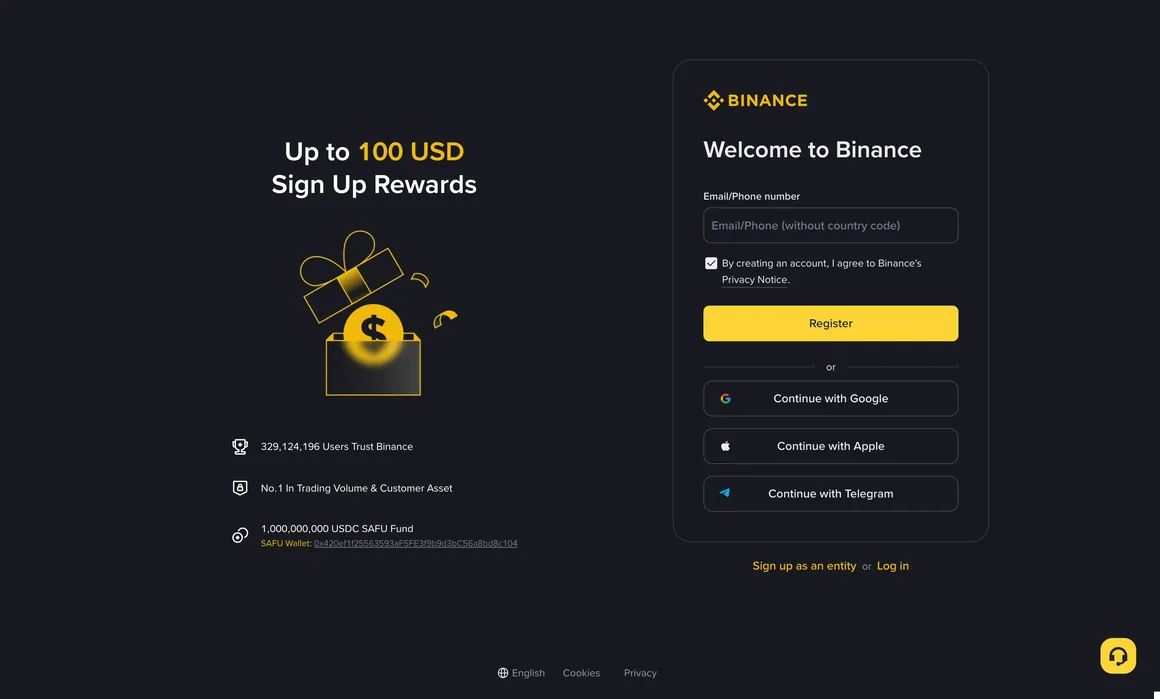
The screenshot above shows how little the form asks for: one field taking either an email address or a phone number, a checkbox for the privacy notice, a Register button, and three shortcuts for signing up with Google, Apple or Telegram. Get to that page yourself, by typing the address or opening the app you installed from the official store, never from an advertisement, a group-chat link or a QR code. Fake sign-up pages are cheap to build and they look right.
Email or phone: pick the one you will not lose. Email survives SIM swaps, carrier changes and a move abroad, which is why I would use it. A number is faster today and a liability later, since recycled numbers and lost SIMs are a common route into being locked out of an account you still own.
The Google, Apple and Telegram buttons save thirty seconds and hand part of your security to a third party; lose that account or have it compromised, and your exchange login goes with it. Email, a password you use nowhere else, and an authenticator app: that combination ages best.
The checkbox is a real document, and the button is not the finish line. Tick the privacy notice knowingly, press Register, enter the code that arrives, and note where that leaves you: the account exists and can do almost nothing until verification clears. If buying is what you came for, that walkthrough is buying USDT for the first time.
Where the invite code goes, and what it changes
The invite or referral code goes into an optional field on the sign-up form, usually folded behind a line reading something like “Referral ID (optional)” and easy to miss. Some app versions instead let you attach one from the referral or rewards page just after the account is created. Placement drifts between versions, so look for the word referral rather than a fixed step number.
Be clear on what that field does. It affects the trading fee you pay, by routing part of the commission the platform already charges back to you as a discount. It touches nothing about your review: not the speed, not the documents, not your limits. And it cannot make an account eligible in a place where the service is not offered.
Treat it as a one-time field: depending on the referral programme's rules at the time, you may not be able to add a code afterwards, or only within a short window. And any headline percentage quoted anywhere, this page included, is a ceiling rather than a promise. What applies to you follows the platform's current affiliate rules and whatever your own fee page shows once you log in.
If you want the fee discount, the code has to be in the box before you press Register. The invite code shown further down this page is the one this site uses; you pay standard fees either way, and nothing about your verification changes.
Set the account up once, properly
Most of the freezes covered elsewhere on this site trace back to a decision made on sign-up day: a name that did not match the bank, KYC rushed through, or withdrawal settings never reviewed. If you are opening the account now, walk through this guide’s sign-up, verification and security steps in order instead of skipping them.
* “Up to 20%” is the ceiling wording used by referral programmes; the rate, scope and conditions that actually apply to you follow Binance's current Affiliate Program rules and what your own account page shows. This block is a referral link that earns us a fee; it costs you nothing extra and doesn't color this article's judgment. This is information and safety education, not investment, legal, or tax advice.
KYC: the document, the selfie, the real checks
Basic verification asks for three things: identity details typed in by hand, photos of an official document, and a short liveness selfie where you turn your head or follow a moving dot. Ten minutes of work, and knowing what each part tests is how you pass first time.
The typed details are cross-checked against what is printed and encoded on the document, so name, date of birth and number have to match character for character. On the photos, the system is looking for security features, signs of editing, and whether you shot a real card or a picture of a screen. Then the selfie gets matched to the document photo, and the movement prompt is there to confirm a live person rather than a still image or a replayed video. Separately, your name goes past sanctions lists, and the platform checks whether it serves people where you live; availability differs by jurisdiction and does change, so check the current status for your country before assuming you qualify.
For a clean first attempt: document flat on a plain dark surface in daylight, no flash, whole card in frame with corners visible, shot with the in-app camera rather than pulled from your gallery. For the selfie, hat and glasses off, plain wall behind you, facing the light.
The bigger reason to take this seriously is what comes later. Verification is what lets you say, with evidence behind it, that you are a real-name verified seller and here is the trade chain behind the money that hit your bank. That sentence is the backbone of every explanation in what to do when your account is frozen after selling USDT, and an account verified in someone else's name cannot make it.
Why verification gets rejected
Rejections cluster into a few causes, and almost all are photography or spelling rather than anything about you. Read the rejection message against this table before you resubmit; sending the same images again just burns attempts.
| What went wrong | How it shows up | The fix |
|---|---|---|
| Glare or blur | “Unreadable” or “image quality”, often on the hologram side | Daylight, no flash, tilt the card to move the reflection off the text |
| Cropped or covered edges | “Full document not visible”; a corner cut off, a finger on the border | Flat surface, shoot straight down, leave a margin on all four sides |
| Name spelling or order | “Details do not match the document” | Copy the document exactly: surname order, middle names, initials, hyphens |
| Expired document | Rejected outright, or accepted now and questioned at withdrawal | Renew first, or use another valid document type |
| Selfie problems | Face match or liveness failure | Hat, glasses and mask off, face the light, plain background, alone in frame |
| Document type not accepted | Not on the accepted list for your country | Check which types are accepted where you live |
| Location restricted | Blocked at sign-up, or products unavailable to you | Confirm the status for your jurisdiction; this is not a photo problem |
The last row deserves more than a line. A restricted location is not a puzzle to route around: availability of exchanges and of individual products varies between jurisdictions and shifts over time, so confirm what applies where you live. Using a VPN to look like you are elsewhere breaks the terms you just agreed to, and that tends to surface at the withdrawal screen.
After two honest failures, read the rejection reason literally rather than hopefully. In the messages readers send me, the same photo goes up four or five times with a different crop when the real problem was a middle name in the wrong field.
Settings to finish on day one
Finish these before any money goes in. They sit in the security section of your account settings, and each closes a door that is hard to shut once someone is already inside.
- Two-factor by authenticator app, not SMS. A texted code is only as strong as your phone number, and a SIM swap moves that number to someone else while your handset quietly loses service.
- A withdrawal address whitelist. Coins can then only leave to addresses you added deliberately, and new ones sit behind a delay. That is what makes a stolen session unprofitable: the thief has your login but not the hours needed to add an address.
- An anti-phishing code. You pick a short phrase and genuine platform emails carry it. Anything without your phrase is fake, however good the logo looks.
- Device management and login alerts. Clear out devices you do not recognise and switch on new-login notifications.
- The mailbox itself. Give your login email its own password and its own two-factor. It is the master key for resets, and a strong exchange account behind a reused email password is not secure.
Do all of them in one sitting before depositing anything, because the setting you plan to do later is the setting that never gets done. The whitelist is the one people resist, since it does slow a first withdrawal to a new address; that is the point, because a delay you notice once is a delay a thief cannot wait out. The step people fumble most often is the authenticator backup key. Write it on paper before you leave that screen, or you find out on the day you change phones that the code generator is gone.
One name across ID, exchange and bank
This is the section that earns the title. The name on your ID, the name on your verified exchange account, and the name on the bank account, UPI handle or wallet that receives your payout must all be one name. When a payout goes wrong months later, this is usually the thing that was out of line from day one.
Look at the trade from outside. Your buyer sends money, your bank sees a credit from a stranger, and if a complaint is filed upstream, an investigator walks that money to your account. Your defence is one sentence: this account is mine, this verified profile is mine, here is the trade behind the credit. If the receiving account is in your brother's name, or the profile carries a spelling your bank has never seen, that sentence stops being provable and starts needing explanation.
The mismatches are rarely dramatic. Your passport prints the surname first and the bank stored it last. Or an initial sits where your ID spells out a middle name, or a transliteration picked one spelling and your document another. Any of these is enough, and the duller cost lands first, since exchanges commonly refuse withdrawals to accounts whose holder name does not match. Fix it while the account is empty, usually by bringing the bank record in line with the document.
The one rule with no exceptions
Never trade on an account that is not yours, and never take payouts into someone else's account, however much you trust them. Lending or renting a verified account makes you the visible front for money whose story you do not know, and if that story involves a fraud victim, yours is the name on the paperwork. The reverse offer, where someone pays you to receive transfers for them, sits at the centre of a large share of freeze cases.
Once the three names agree, the rest gets simpler: take payment only from the counterparty's own verified account, keep the trade inside platform escrow, and move money out on a rhythm your bank reads as ordinary. Those habits are in withdrawing to your bank account safely and choosing a payment method that does not raise flags.
When sign-up or verification stalls
Most stalls have a boring cause and a boring fix. Match your situation to one of these before you assume something has gone badly wrong.
- The code never arrives. Check spam and promotions, confirm the address or the number with its country code, and wait before asking for another; hammering resend can trip a temporary limit. For phone codes, weak coverage and carrier filtering are the usual causes, and switching to email settles it.
- Verification sits in review for days. Queues lengthen after busy market periods. Do not stack a second application on the first, which pushes you back rather than forward.
- Rejected twice on the same document. Change something real, not just the crop: re-read the stated reason and check your typed details letter by letter.
- Restricted right after your first login. A new country, a new device or a VPN can trigger a security check. Log in from your usual device and network, finish the step it asks for, and keep the VPN off for exchange sessions.
- The service is not available where you are. If the platform says it does not serve your jurisdiction, that is a wall, not an obstacle. Find a venue properly available to you rather than faking a location.
- Someone offers to get you verified for a fee. Treat that like the paid unfreeze agents in the frozen-account guide. A KYC pass for sale is either nothing at all or an account verified with someone else's documents: an identity that is not yours and a payout trail you cannot defend.
One rule holds throughout: get help only through in-app support or the help centre you reach from inside the app. Support never asks for your password, your codes or your recovery key, so a stranger in a chat group who wants any of those is not support.
Before your first trade, tick these off
- ID valid, unexpired, spelled the way you will use everywhere
- Registered through the address or app you opened yourself
- Contact details you will still control in a year
- Invite code entered at sign-up, if you want the fee discount
- Verification cleared, typed details matching the document exactly
- Authenticator two-factor on, backup key on paper, stored offline
- Withdrawal whitelist on, anti-phishing code set, login alerts on
- Payout account in your own name, spelled as on your ID
- Login email hardened with its own password and two-factor
None of this removes the risk; sellers who do everything on the list still occasionally receive tainted money. What it changes is the odds, and the position you are in when it happens.
FAQ
Do I have to finish verification before I can buy or sell USDT?
In practice, yes. The account itself is created in minutes, but deposits, trading and withdrawals open up as you clear identity verification, and P2P trading in particular runs on verified real-name accounts. Doing it at sign-up is also the cheaper order: verifying while the account is empty means no balance sitting behind a review, and no deadline pressure pushing you into sloppy document photos.
Does the invite code affect whether my account gets approved?
No. A referral or invite code only affects the trading fee you pay, by returning part of the commission the platform already charges. It does not speed up or slow down verification, does not change which documents you need, and does not change your limits. It also cannot make an account eligible in a place where the service is not offered. Enter it at sign-up if you want the discount, and judge the actual rate from your own fee page after you log in.
My bank spells my name differently from my ID. Does that matter?
Yes, and it is worth fixing before you trade. Exchanges commonly refuse withdrawals to accounts whose holder name does not match the verified account name, and a mismatch weakens your position if a payment you received is ever questioned. Line the bank record up with your ID document, since the document is the part you cannot edit, then type your exchange details straight from the document rather than from memory.
My verification was rejected twice. Should I open a second account?
No. Extra accounts usually breach the platform terms and can get every account you hold restricted, which leaves you worse off than the rejection did. Read the stated reason literally instead: most failures come down to glare on the document, a cropped edge, a selfie shot against a bright window, or typed details that do not match the document character for character. If you cannot see the cause, ask through the app's own support channel which field or image failed.
Which two-factor method should I turn on first, SMS or an authenticator app?
The authenticator app. Text-message codes depend on your phone number, and a SIM swap moves that number to someone else while your handset quietly loses service. An app generates codes on the device itself, with no carrier in the middle. Write the backup or recovery key on paper and keep it away from that phone and away from the mailbox you log in with, so changing phones does not lock you out.
Sign-up day is cheap to get right and expensive to get wrong, because every mistake here is invisible until money is moving. Keep the spine of it: your own documents, your own payout account, one spelling of your name in all three places, verification cleared while the balance is zero, and the security settings finished in the same sitting. When that is done, go on to your first USDT purchase, step by step, then to moving money out to your bank without raising flags. The rest of the series sits in the cash-flow guides index.